Get started
Set up fauxcloud and pair your console. Then the console uploads to fauxcloud instead of the cloud, and the dashboard shows its first reading.
Before you start
- An ESP32-WROOM-32 board with 4 MB flash and a USB data cable (see Boards).
- fauxcloud on that board (see Flash the board). You do this once, from a computer.
- Your weather console (your weather station's display unit), plugged into its wall adapter.
- A phone, and a home Wi-Fi on 2.4 GHz. The board has no 5 GHz radio.
On batteries the console turns its Wi-Fi off completely and sends nothing. Its pairing mode also starts only on the adapter.
fauxcloud is verified on one unit: Vevor 7-in-1, model YT60234, firmware 1.0.1, EU 868 MHz. Other consoles with the same setup page are likely to work, but are not yet tested. See Compatibility.
Set up fauxcloud
fauxcloud runs two Wi-Fi networks at once. It joins your home Wi-Fi, so you can open the dashboard from any device at home. It also opens a small network of its own, fauxcloud-XXXX, only for your weather console. The console never reaches your home network or the internet. In the Wi-Fi names on this page, XXXX stands for four characters that are different on every board.
Power the board from USB.
You should see the board's LED blink fast, four times a second, and a Wi-Fi called
fauxcloud-setup-XXXXon your phone.Join
fauxcloud-setup-XXXXwith the passwordfauxcloud. Some phones open the setup page by themselves. If yours does not, openhttp://fauxcloud.setupin the browser, withhttp://.You should see the setup page, Step 1 of 4. Android and Samsung phones may say "Internet may be unavailable". Choose to stay connected. Otherwise the phone keeps using mobile data and cannot reach fauxcloud.
Answer the four steps:
Step What it asks Your home Wi-Fi Pick your network from the list (2.4 GHz only), or My network is not listed, and type its password. Where is the station? The nearest city. It sets the clock for daily totals and the midnight rain reset. It also tells the dashboard when the sun rises and sets. Admin password A password for Settings (the dashboard's Admin button, a padlock on a phone, opens it), at least 8 characters. Your phone turns it into a hash (a scrambled code) and sends only that, never the password. Wi-Fi for your weather station A password for fauxcloud-XXXX, the network your console will use. Generate makes one. Write it down: you type it into the console once.On Ready to go, press Apply.
You should see "Joining" and the name of your network for up to a minute, then fauxcloud is on your home network with its address, for example
fauxcloud.local.Reconnect your phone to your home Wi-Fi and open
http://fauxcloud.local.You should see the dashboard with No console paired yet. and the two pairing steps.
TipIf
fauxcloud.localdoes not open (some routers and phones do not resolve such names), find the board in your router's list of connected devices. It appears there asfauxcloud, the name the board gives the router when it joins. Open its address instead, for examplehttp://192.168.1.50. The address may change after a router restart unless you reserve it in the router.
If fauxcloud cannot join your home Wi-Fi, the setup page stays open and says why: the router rejected the password, the network was not found, the router gave no address, or there was no connection within a minute. If your home network itself uses 192.168.77.x, the address range of fauxcloud's own Wi-Fi, the page tells you to change your router's range first.
Setup closes after 30 minutes without activity. Hold the board's BOOT button for 1 to 3 seconds to open it again (see Boards).
Pair the console
On the console, hold BARO for more than 3 seconds.
You should see
APon the display: the console has opened its own setup Wi-Fi. Your phone lists it asWWS-XXXXXX.Join
WWS-XXXXXXwith your phone and openhttp://192.168.1.1.You should see the console's setup page. If nothing opens, turn mobile data off and try again. The console's network takes one device at a time and sometimes drops it.
Fill in the console's page as in the table, then apply. Then go on to Check it works.
| On the console's page | What to enter |
|---|---|
| Wi-Fi network | fauxcloud-XXXX, fauxcloud's own Wi-Fi |
| Wi-Fi password | The password you chose in the last setup step. It is not your home Wi-Fi password. |
| Weather Underground | Tick it. |
| Station ID | Any name, for example Garden. It becomes the station's name in fauxcloud (a station is fauxcloud's record of one console). |
| Key | Any text. fauxcloud remembers the first key it sees for this station. |
| Weathercloud | Leave it off. fauxcloud answers it and does not use it. |
| Time server | Leave it on. fauxcloud answers it. |
If you forget the password of fauxcloud-XXXX, open Settings, find fauxcloud Wi-Fi for your station and choose Show password. It asks for your admin password first and hides the password again after 60 seconds.
The console's own Apply also overwrites the time zone you set in its menu. Check the time zone on the console afterwards.
If you change the key later, accept the new key in Settings: the station shows "Key changed".
Check it works
On the verified console the first upload arrives about 12 seconds after it joins, then one about every 65 seconds. Within about two minutes the dashboard shows the first reading.
The wind averages over 2 and 10 minutes fill within 10 minutes. The rain of the last hour fills within the hour.
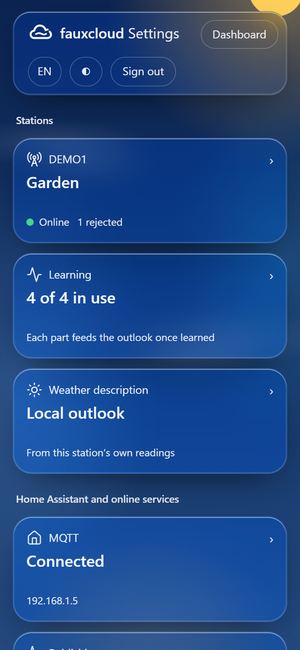
To see the uploads themselves, open Settings, the station, and its Console tab. Each upload is one line, with the ID and key hidden.
GET /weatherstation/updateweatherstation.php?ID=***&PASSWORD=***&dateutc=2026-6-15%2012:00:05&baromin=30.01&tempf=65.5&humidity=64&dewptf=52.9&rainin=0.00&dailyrainin=0.09&winddir=248&windspeedmph=7.5&windgustmph=11.8&UV=3&solarRadiation=412.6A console that lost its clock (batteries out) uploads only after it gets the real time. fauxcloud takes the time from the internet, your router, or your phone when you sign in to Settings.
If it didn't work
- No AP appears when I hold BARO
- The setup page at 192.168.1.1 does not open
- The console joined, but the dashboard shows nothing
- fauxcloud.local does not open
Next: the dashboard. To open it with one tap, add it to your phone's home screen: On your phone.